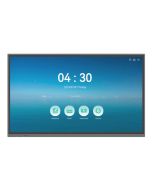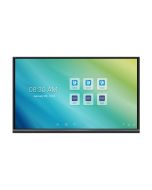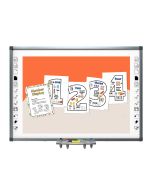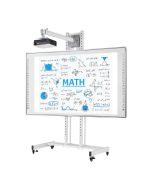

Smart Board for Classroom
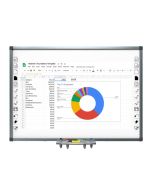
Main Specification:
Brand: VARITO
Origin: Germany
Manufacture: China
Model: VIWB
Display: 75"/86"/96"/106"
Resolution: (3840 x 2160) Pixels
Brightness: 350cd/m2 nits
View Angle: 178°, Life time : 60,000hrs
Touch Point: 10 Touch, Writing: Pen/Finger
Frame Metal: Aluminum Alloy
Surface: ABS board corner and anti-reflective nano surface
High precision and anti-interference come invincible user-experience
Smart Board for Classroom
Smart classrooms are no longer a “future idea”, they're a real need for schools, coaching centers, colleges and training institutes across Bangladesh. Today’s students learn faster when lessons are visual, interactive and easy to understand. That’s why the Smart Board for Classroom category has grown so quickly: it combines a large digital screen with touch-based writing and interactive teaching tools, helping teachers explain better and students stay engaged longer.
A smart board turns everyday lessons into interactive sessions. Teachers can show videos, diagrams, slides, PDFs, or online content, then write directly on the screen to highlight key points. Students can participate, solve problems and collaborate in real time. It reduces the gap between “teaching” and “understanding” especially in subjects like math, science, English and ICT.
What is a Smart Board for a Classroom?
A smart board for the classroom is a digital teaching board that supports interactive lessons. Unlike a traditional whiteboard, it can display digital content and often allows touch control and writing with a finger or pen. Depending on the model, it may include:
-
Multi-touch writing (two or more people can write at the same time)
-
Built-in whiteboard and annotation tools
-
Wireless screen sharing from laptop/mobile
-
Built-in Android system (in many interactive flat panels)
-
Multiple ports for USB, HDMI, audio and accessories
In a classroom setting, the smart board becomes the “center” of teaching. It replaces the need for separate tools like projectors, marker boards, printed charts and sometimes even extra monitors.
Why Smart Boards are Important for Classrooms
In Bangladesh, classroom challenges are often practical: large student groups, varied learning levels, limited time and sometimes limited teaching resources. A smart board helps solve these problems in a direct way.
1) Better student attention and engagement
Students naturally respond to visuals, motion, and interaction. A smart board allows:
-
Interactive quizzes
-
Visual explanations
-
Fast topic switching
-
Student participation on screen
Instead of passive learning, lessons become active and memorable.
2) Clearer understanding for complex topics
Many students struggle when topics are explained only verbally. Smart boards let teachers:
-
Draw diagrams neatly
-
Zoom in on content
-
Show real examples (videos, animations, maps, experiments)
-
Annotate directly on learning material
This is especially useful for science, math, geography, and English writing.
3) Faster teaching and better time management
Teachers save time by using prepared content and reusing lesson materials. They can:
-
Open saved notes
-
Use templates
-
Store topic-wise lesson files
-
Repeat the same lessons across multiple batches easily
For coaching centers, this can become a big productivity advantage.
4) Supports modern curriculum and digital learning
Many institutions are shifting toward digital education and blended learning. Smart boards support:
-
Multimedia lessons
-
Online resources
-
Interactive apps and tools
-
Hybrid teaching models (in advanced setups)
Smart Board for Classroom: Key Benefits
A good classroom smart board is not about “showing off technology.” It should deliver real results. Here are the benefits institutions notice quickly:
Cleaner writing and better visibility
Unlike marker ink that becomes light or messy, digital writing is clean, bright and visible. Teachers can change colors, thickness, and erase instantly.
Saves and shares lesson notes
Many smart boards allow teachers to save whiteboard pages and share them to students later. That’s helpful for revision, absentees, or online follow-up.
Supports multiple learning styles
Some students learn visually, some by reading, some by interaction. Smart boards support all three:
-
visual content
-
written explanations
-
interactive participation
Makes classrooms more modern and competitive
Parents and students prefer institutions that look modern and deliver better learning experiences. A smart board can improve the perceived value of a school or coaching center.
Types of Smart Boards Used in Classrooms
When customers say “smart board,” they may mean different solutions. For classrooms, the common types are:
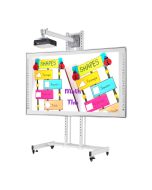
1) Interactive Whiteboard (touch board)
Focuses on interactive writing and teaching. Often used in school setups that want smart teaching at a practical budget.
2) Interactive Flat Panel (all-in-one smart board)
This is a premium solution. It combines:
-
Large display
-
Multi-touch
-
Built-in Android system
-
Speakers
-
Teaching apps
-
Multiple ports and wireless sharing options
This type is popular for schools aiming for a complete smart classroom solution.
Smart Board Size Guide for Classroom
Choosing the right size is critical. If the board is too small, students at the back can’t see details. If it’s too large for the room, it may feel uncomfortable and costly.
Recommended sizes by classroom type
65 inch smart board
-
Best for: small coaching rooms, small classrooms
-
Works well when students sit closer to the front
75 inch smart board
-
Best for: standard classrooms
-
Balanced choice for most schools and colleges
86 and 96 inch smart board
-
Best for: large classrooms, training rooms, seminar rooms
-
Ideal when the class is wide or deep
Important Features to Check Before Buying
To choose the best smart board for classroom use, compare these features. They directly affect performance and long-term satisfaction.
1) Display clarity (4K recommended)
A classroom smart board should show text clearly. For 75" and above, 4K resolution is highly recommended because students can read text from distance without strain.
2) Brightness and anti-glare surface
Bangladesh classrooms often have strong tube lights and daylight. An anti-glare surface helps content stay visible. Good brightness prevents the “dull screen” issue.
3) Touch points and writing experience
For classrooms:
-
10–20 touch points are usually enough
-
writing should be smooth using finger or pen
-
touch response should feel instant
If touch is slow, teachers will avoid using it.
4) Durable frame and corner protection
Classroom devices face daily use. Choose a strong frame and reliable surface protection. Durability reduces repair cost and increases product life.
5) Built-in Android and classroom tools (for all-in-one models)
If your institution prefers using apps, browsing, playing videos, or using teaching tools without a PC, built-in Android is very useful.
6) Connectivity and ports
A good classroom board should support:
-
HDMI/USB ports
-
audio output
-
Wi-Fi for sharing and updates
-
optional Type-C for modern laptops
7) Warranty and technical support
This is a big factor in Bangladesh. Schools need fast support. Always buy from a supplier who can provide:
-
genuine warranty
-
installation
-
training
-
after-sales service
Smart Board for Classroom Use Cases
Smart boards work exceptionally well for:
Mathematics
-
step-by-step solving
-
clean diagrams
-
zoom in/out for clarity
-
multiple students solving together
Science (Physics/Chemistry/Biology)
-
animations and experiments
-
labeled diagrams and structures
-
real-world videos + teacher annotations
English and Bangla
-
writing practice and correction
-
grammar notes and highlighting
-
reading comprehension with annotation
ICT and Computer Studies
-
live demonstrations
-
software tutorials
-
interactive slides and practice
How to Set Up a Smart Board Classroom
A proper setup ensures the board performs well and lasts longer.
Recommended setup checklist
-
Strong wall mount or trolley stand
-
UPS or voltage protection
-
Proper cable management
-
Stable internet (if using online content)
-
Teacher orientation and basic training
Training matters: Even a great smart board fails if teachers don’t feel confident using it. A 30–60 minute training session usually solves that.
Common Mistakes to Avoid
Buying only by price
The cheapest board can become expensive later if touch is weak, service is unavailable or the screen fails.
Choosing the wrong size
If students can’t see, the smart board becomes underused. Size should match room conditions.
Ignoring warranty and support
Schools need service. Always check warranty terms and supplier reliability.
Not planning accessories
Wall mount, UPS, cables and installation should be part of the package.
Conclusion
A Smart Board for Classroom is one of the most effective upgrades for modern education in Bangladesh. It improves student engagement, helps teachers explain better, saves lesson time, and creates a truly interactive learning environment. The best smart board is not simply the most expensive one, it's the one that matches your classroom size, delivers smooth writing, shows content clearly and comes with reliable warranty and technical support.
If your institution wants a modern, competitive classroom experience that students and parents will appreciate, investing in the right smart board is a smart long-term decision.